Version 0.9.2
What’s new in Homepage Panda 0.9.2
November 2026 · Free update for everyone
This release brings Homepage Panda to the iPad, lets widgets move between pages, and fixes two apps that could jump out of your App Library.
iPad support
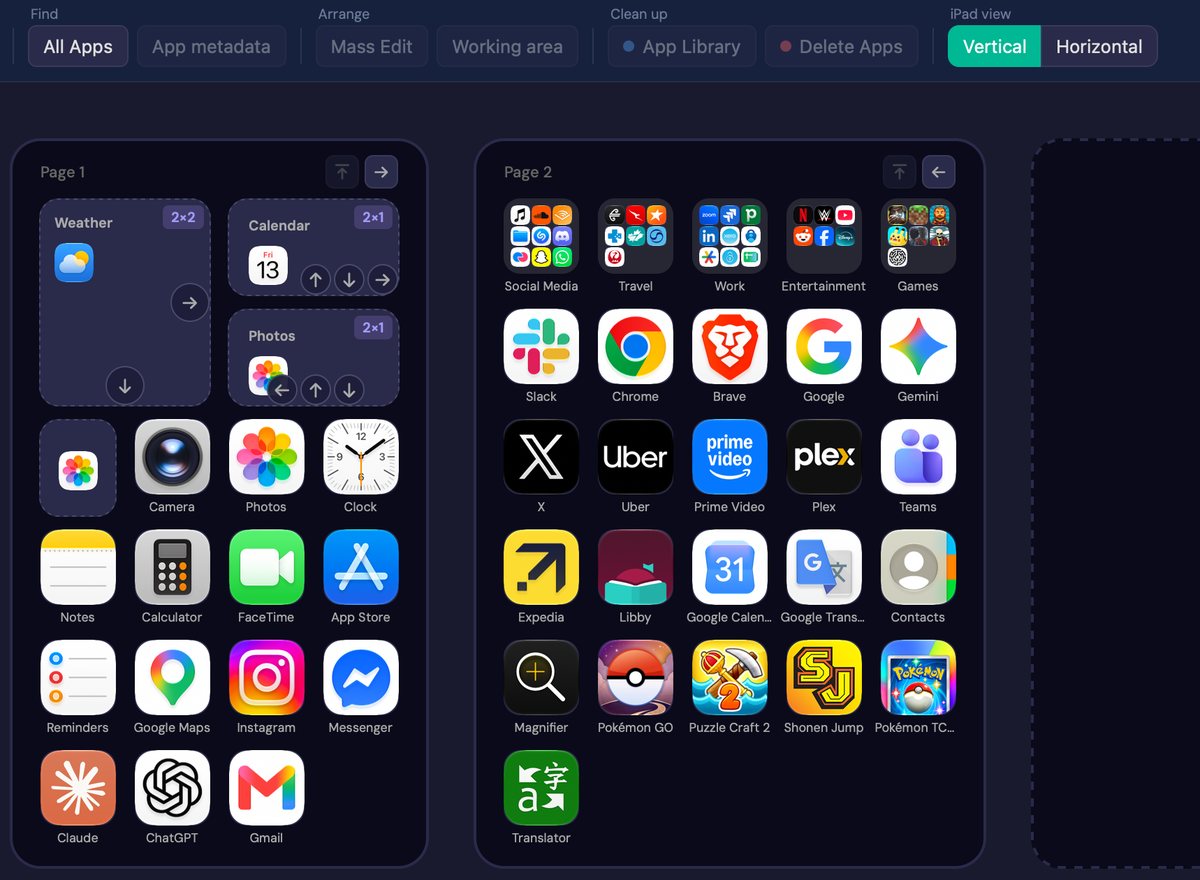
Plug in an iPad and the editor shows its real Home Screen: bigger pages, its own Dock and its own folders. Arrange it with your mouse and apply, the same way as on an iPhone.
- Pages are the iPad’s own size: 30 icons, or 24 on a page with widgets. Widgets take their iPad sizes, and Smart Stacks move like any widget.
- The Dock holds up to 20 apps, folders included. Folders hold 16 apps per page.
- An iPad view switch shows your pages Vertical or Horizontal. Vertical shows exactly what Apply sends. In landscape the iPad arranges widgets its own way, so Horizontal is a preview.
- Empty spaces you leave stay on the iPad while it’s upright.
Tested on an iPad Pro with iPadOS 26. If you used 0.9.1 with an iPad and Apply squeezed its Dock or refilled its pages, restore the backup from before that Apply (Backups > iPads) and apply it: your iPad goes back to how it was.
Move widgets between pages
Widgets now drag like apps. Drop one on another page, move it around its own page, or drop it on + Add Page to give it a page of its own. On a full page it stays where you drop it and the last apps move on to the next page. The arrows still nudge a widget on its page.
Passwords and Shortcuts stay in your App Library
On some iOS and iPadOS versions, applying a layout put Passwords and Shortcuts back on a page even though you kept them in the App Library. They stay where you keep them now.
And more
- Backups know their device. The Backups menu has iPhones and iPads tabs, and an iPad backup can’t be restored onto an iPhone by mistake, or the other way round.
- Unplugged or swapped devices. Unplug your phone, or plug in a different one, and editing pauses with your changes kept. Plug it back in to carry on, or load the new one.
- Widget names. Widgets show the name of their app, as your device calls it.
- An empty Dock takes drops anywhere on it.
- Safer drags out of folders. An app dragged out of a folder only lands outside it after you rest on a spot for half a second, and that spot gets a green ring. Let go sooner and it stays in its folder, so a slip doesn’t push the apps on the page behind along.
- Plus fixes.
See every change in the full changelog.
Already have it? Open Homepage Panda and click Update & Restart. Your license and backups carry over.